Welcome, Teachers! Thanks for stopping by to learn about multimodal and digital literacies. This Blog post #1!
Welcome to my blog about incorporating digital technology into literacy lessons for students of all ages and abilities. I’m Marti and am a graduate student in Reading.
These next few posts will be a response to chapters I’ve read in the book Integrating Technology in Literacy Instruction. I hope to provide you with new ways of thinking about literacy, literacy instruction, and communication.
Commentary on Intro and Chapters 1, 2 & 3
There are many kinds of literacy today, from traditional literacy to transliteracy and they’re called multiliteracies or multiple literacies. Literacy isn’t just paper and pencil reading and writing anymore. With the advent of the internet and digital technology, we teachers must be aware of the terminology, how to use digital technology effectively in our classrooms, and when to revert to traditional literacies.
Let’s get started by understanding the terminology used today in literacy education. All definitions are borrowed with appreciation from:
Lisenbee, P. S., Pilgrim, J., & Vasinda, S. (2020). Integrating Technology in Literacy Instruction: Models and frameworks for all learners. Routledge.
11 TermstoKnow
multiliteracies: plural literacies that reflect pedagogical shifts in thinking about what constitutes literacy. AKA multiple literacies. Reflects multiple ways to communicate through print, photos, videos or graphs. Refers to a wide range of literacies valued by a culture and/or discipline. Communication is multimodal within this definition.
traditional literacy: includes reading, writing, speaking, listening, viewing and visual representation, and includes digital formats. This is the basis of classroom literacy today.
digital literacy: using informational technologies and the internet to research, evaluate, use, share, and create content.
information literacy: the ability to locate, evaluate, and use information effectively, and ways to communicate and produce information ethically.
media literacy: includes audiovisual, digital, advertising, internet, film, and visual arts and requires readers to understand the messages being delivered
computer literacy: changing rapidly, it is computer usage and the knowledge and skills required to use the computer effectively
critical literacy: a way to analyze and question content, to determine the author’s purpose and bias, and to examine the power structures being presented and those voices that are omitted
web literacy: how to navigate the internet; to locate, evaluate, and analyze content and authorship
New literacies (capital N): incorporates theory to explain new ways to communicate with technology; social practices are central
new literacies (lowercase n): any technique that requires a technology tool to read and write instead of using pen and paper
transliteracy: explains the crosse-disciplinary nature of literacy and includes social, situational, cultural, and technological contexts
Our Changing World and Equity
Have you ever thought about equity about literacy? Years ago, equity (or inequity) was reflected in access to resources. A lack of books or lack of access to books or lack of access to reading materials was the root of literacy gaps in some places in our country. For example, many impoverished neighborhoods suffered from underfunding, which affected available resources.
Today, the same problem remains. Only instead of a lack of books as resources, many schools lack computers for students to use and internet access. This is literacy inequity in our school systems. Wealthy school districts provide computers and internet service for their students while less well-funded districts cannot afford these literacy tools for their students.
So literacy tools (i.e. computers and access to the internet) are available to some students but not to others, which widens literacy gaps throughout our country. This is one way societal change and technology in particular has affected literacy development.
Pedagogy: How can teachers help with equity?
Pedagogy refers to the way teachers practice, using theory and teaching strategies to inform instruction. Pedagogy is fueled by beliefs and concerns. Pedagogy varies from teacher to teacher, grade to grade, and school district to school district.
It may feel as if we teachers can’t do anything to help solve the problem of inequity in our classrooms. But, there are things we can do to understand our students and to teach literacy more effectively. Here are a few suggestions:
Embrace multiliteracies as a theory to teach by, focusing on diversity, multimodality, and lesson design. This is called reflexive pedagogy.
Appreciate that communication varies across cultures
Know the structure of written messages has changed
Notice that context makes a difference in literacy
Design lessons to accentuate student strengths and allow agency and variability in how they communicate
Universal Design in Learning (UDL)
What is Universal Design and how does it relate to literacy teaching and learning? UDL is a philosophy of designing a curriculum to be usable to all students and to enable learning to be accessible to all students from diverse backgrounds. It’s an approach that optimizes teaching and learning.
Differentiated instruction is considered when lesson planning using UDL as a learning framework. UDL incorporates these three principles:
Multiple means of representation: Multiliteracies allow students various modes of communication and various modes of representing literacy learning.
Multiple means of action and expression: Students show what they know using various methods of communication and can convey their ideas in multiple ways
Multiple means of engagement: Students are motivated to participate and learn because they’re working together to create podcasts slide shows or other modes of technological expression.
Thanks for stopping by and taking the time to read this. Please feel free to share your thoughts. I’m eager to know what you’re doing in the classroom and how digital technology is working for you and your students. Goodbye for now! Marti
Digital tools provide more ways to access and be successful with alphabetic literacy.
Lisenbee, et al.(2020), p. 35
2-2-24
Hello, Teacher Friends!
Today for blog post #2 I want to comment on a new idea I learned about in Digital Literacies, which is called TPACK. Have you heard of TPACK? It's an acronym for Technological, Pedagogical, and Content Knowledge.
Today's teachers need to know more than just content knowledge or CK (what they're teaching) and pedagogy or PK (how they're teaching it). We also need to understand technology: the tools available to us to employ for various lessons and activities, depending on students' ages and abilities. These kinds of knowledge intersect and as such, we must be aware that technology is now an integral part of our teaching craft.
There are instructional frameworks for teaching in a way that integrates technology. One such framework considers learning goals, pedagogical decisions, activities, assessments, and tools and resources. How do you include technology in your lesson planning?It's a great way to differentiate instruction so all learners can understand.
With the advent of technology becoming more and more accessible in classrooms around the United States, teachers can make more appealing choices of tools for students to use, which in turn makes learning more fun and more memorable.
Here's a fun video describing how tech is implemented in education. Take a look and see what you think. Are you prepared to teach using tech? It's something to think about!
Keep in touch and let me know how you're using technology in your classroom! Until next time... Marti
February 9, 2024
Dear Teacher-Friends,
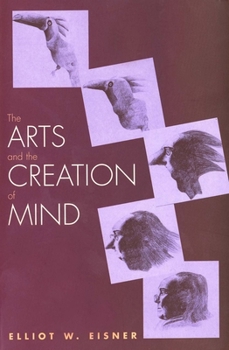
Today's blog post #3 focuses on Chapters 3, 4, and 5 in the book Reimagining Literacies in the Digital Age by Schmidt & Kruger-Ross. What I kept pondering while reading is that reimagining literacy is not new: philosophers, teachers, and students all have interpreted visual arts as a type of literacy for many, many years. Think of art critics, for example, who form ideas and interpretations about what they visualize, and art critics are not new. In fact, my master's thesis proposed incorporating visual arts into mainstream academic curricula because visual arts are a form of literacy. What is new is the attention these other forms of literacy are now receiving from academics. Is this the result of our technological age? I'm not sure. My master's thesis was influenced by Elliot Eisner and I'd like to take a moment here to pay tribute to him.
When I was teaching in Marblehead Public Schools in Marblehead, Massachusetts, there was a professional development offering by the head of the art department.
Dr. Eisner was a professor of Art and Education at Stanford and his scholarly work contributed to the formulation of educational policy to understand the potential of arts in education. He wrote, “I would like to propose that the art education curriculum be built along three major lines of focus. These three foci are the productive aspects of art, the critical aspects, and the historical aspects." The productive aspects of art are where the students engage in actually producing works of art, while the critical aspects focus on students’ having the language to critique and talk about a work of art and its effect on them as a viewer and the historical aspects cover the movements of art over a course of time. Clearly, Eisner believed visual art was a form of literacy.
Our PD was centered on his book The Arts and the Creation of Mind (2004). We teachers read the book and each of us developed a piece of art as a response to his ideas that visual arts promote deeper thinking and can positively change the aims of education. I made a fabric quilt as my artistic response, with each square representing a different idea from each chapter. I wish I had a photograph to show you but that was years ago in 2005, before iPhones, selfies, and posting to social media were common.
Chapter 3 in Reimaging Literacies in the Digital Age suggests visual literacies in the classroom include artwork, photographs, and graphic novels. This is a great start for us to consider how to incorporate visual literacies into classroom discussions and lessons! Chapter 4 delves into memes and their popularity and ubiquity. Have you ever heard of six-word memoirs? Memes are quite similar to them. Six-word memoirs use only six words to convey a story and memes do the same things, only using digitalization. Isn't that a cool way to integrate technology into English Language Arts lessons?
Chapter 5 discusses infographics, not a new concept either, but the ability for students to create them digitally is new. Students' writing pieces can become much more sophisticated today, where they can add QR codes, Canva, and other apps, and Google Drawings, among other free online tools, to enhance written pieces. Much of what students create now is akin to well-polished advertising produced by adult executives! So now our teaching must encompass these digital tools, their proper use, and their application.
Keep in touch and let me know how you are using these new technologies in the classroom! What have your students' experiences been? Do you see visual arts as another form of literacy as Dr. Eisner did?
Bye for now! Marti
February 15, 2024
Dear Teacher Friends,
Today's blog post #4 is about aural literacies. Have you heard this term before? Aural (and oral) literacies are speaking, listening, and hearing and have become part of our definition of literacy today. Classroom discussions are one way students use their aural literacies.
Of interest to me in chapter six in Reimaging Literacies in the Digital Age was the chart that defined the levels of listening, as shown below. We listen (or not listen) for various purposes, just as we read and write for various purposes. Students use all of these forms of listening in the classroom, which has implications for teaching. We decide whether students are listening or not, and if they are, how are they listening? Are they listening to us as we explain a lesson? Are they listening as they communicate with each other? How do we know whether they are listening?
Imagine during read-alouds some students are not listening. Then what do we do as teachers? Do we redirect them to listen? Or do we wait for them to pay attention? Or do we choose to do nothing and allow students to not listen? Or, are students really listening but not demonstrating the listening behaviors we expect them to? Or, if students are listening during a read-aloud, we must guide them how to listen: to evaluate the text as it's being read, for example.
Music and song lyrics are other forms of aural literacy and can be used effectively to extend lessons, provide background knowledge, and teach basic skills. Think of the ABC song many children learn in kindergarten. It provides them with alphabetic knowledge and helps students remember their letters. This is a form of aural literacy that teaches basic skills. As an example of aural literacy, here is a great website that uses music to teach basic skills to children:
In addition to these ideas of aural literacy, there are many more. For instance, many students who struggle to read or who have dyslexia as a diagnosis may use audiobooks to supplement their reading or to decode books while they follow along. This is a wonderful website for teachers that provides audiobooks for free:
Audiobooks can be as important as visual literacy, where reading text is typically occurring.
In addition to audiobooks, students can now produce their own podcasts, which utilize many academic skills. CommonSense Media provides many options for podcasts for children. Pickle from NYC has podcasts with topics of interest to children, and some podcasts children produce. I'm Telling On You is an example you may listen to now!
Students can produce their own podcasts, too. If you're teaching a lesson on interviewing, for example, students can practice interviewing techniques and question-asking while creating a podcast. Soundtrap is a website that shows students how to create podcasts. Click here: How to start a podcast using Soundtrap to get started!
There are so many opportunities to use technology to develop and employ aural literacy in the classroom! Which technologies will you use? Keep in touch and let me know!
Happy (belated) Valentine's Day and Happy Listening! Marti
February 19, 2024
Good morning, Teacher Friends,
Today's blog post #5 is about Chapters 9, 10, 11, and 12 in Reimagining Literacies in the Digital Age.
Chapter 9 - Focusing on Multiliteracies:Multiliteracies are the many ways we make meaning in our lives. Because students bring multimodal ways of thinking, viewing, reading, and writing to our classrooms, we must teach students to carefully consider them, analyze them, and critique them. Our world is changing and how we communicate is changing, and education must keep pace with these changes. Here is an example of what multiliteracies are for young learners.
Here is another video that explains multiliteracies that are used for students who have special education needs.
If students are going to use IM, Snapchat, texting, and other multiliteracies, we must embrace those methods of communication. In some ways, the content of this chapter reminded me of the old adage: If you can't beat 'em, join 'em! Movies and videos are examples used in this chapter to show how multiliteracies can be integrated into ELA lessons. In addition, teachers can create thematic sets of multiliteracy materials, which makes learning much more interesting and engaging than it was generations ago. Finally, portfolios are created using various technologies, which are an innovative and fun way to do assessments. Here is a website that gives us ideas of types of portfolios we can make: Portfolio examples for teachers
Chapter 10 - Consuming Multimodal Texts: Augmented and Virtual Reality: What are augmented reality (AR) and virtual reality (VR) are how do they relate to one another? An example of augmented reality would be an Apple watch, which can do much more than simply tell time. It's a reality that's enhanced or modified beyond what we normally consider traditional. AR mediates our experiences with the real world. Virtual reality (VR) includes apps that enable us to interact with characters and places that are not real. The authors use the example from 2016 of Pokemon Go, where players could interact with their immediate environments and cartoon virtual characters to play a game. These two realities, AR and VR, overlap and even technology specialists are unsure how to categorize them! Photo filters are another example of AR/VR. As applied to literacy, students can now engage with filters to present artwork, for instance. If you follow this link here you will see many filters offered by TikTok, and just for fun, here is a video to show you how to use filters:
Chapter 11 - Producing Multimodal Texts: Digital Video: Reviewing the history of technology, it's fascinating to notice how quickly it changes, from VHS tapes (which I remember!), to Betamax tapes, to other kinds of mini-tapes. Sometimes it feels impossible to keep up with technology, doesn't it? Look at our iPhones: we can do many tasks on one piece of technology, including taking photographs and videos, which might have been unthinkable even 20 years ago.
Digital videos are considered a type of multimodal literacy and the authors use video clips, movie trailers, and series trailers to help us understand how this technology applies to literacy today. They used A Handmaid's Tale as an example; I remember reading the book in college. What a different experience I would have had --- and a different recollection of the story --- if I had watched a movie trailer and/or heard a podcast about it! This website shows us how to create a digital story: Create a digital storyVisme is a website to make a free video! There are many ways to incorporate digital videos into lesson plans, making learning more relevant, engaging, and fun for all.
Chapter 12 - Conclusion:Literacy is now literacies. With the advent of technology, there is no one type of literacy. Students are using multimodal literacies already, so let's join them and use them in class too, making learning and teaching fun for all involved!
February 29, 2024
Hello, Teacher-Friends,
Welcome to Blog Post #6! Today, I'll discuss Integrating Technology in Literacy Instruction Chapters 6 and 7, which encompass the use of the internet in literacy instruction --- Web 2.0 Tools and Online Reading and Research.
Do you know what Web 2.0 means? It is a term coined by Tim O'Reilly (2005) to describe the capability of two-way communication and collaboration on the World Wide Web. It's also called the read-write web. Today's applications have changed how we use the web from how it was originally intended. For example, there is a lot of user-generated content on the web now. Think podcasts and blogging!
Here is a depiction of Web 1.0 and how it differs today from Web 2.0 (photo credit: the University of Michigan):
This figure shows how web usage has dramatically changed over the years to encompass transactional discussion. Now users can create content, collaboratively research and share information, and even remix information to create new digital content. Social media platforms are burgeoning, to the point where parents have difficulty keeping up with their children. With education, teachers can incorporate social media platforms like edublogs, Photoshop, and Flip into lessons so students are highly engaged.
Here is Flip (f.k.a. FlipGrid) used in a math lesson. Doesn't it look like fun? These Web 2.0 tools allow a variety of representations of information, expression, and engagement. And who wouldn't like that?
In addition, online reading and research are the way to go in today's classrooms. Today's library is global. We can get books from anywhere because the internet is linked to a global library system. Teachers now teach how to research online and include web navigation strategies. What happened to card catalogs? They're all for sale on eBay now! Instead, students use search engines like Google or Yahoo to do research and find texts. Further, instead of call numbers on books, the internet uses URLs (universal record locators).
New terminology like hyperlinks, and bookmarks, and webpages must be taught to students so they can research effectively. Children must be taught critical thinking skills like analyzing, assessing, and reconstructing information. Remember what our teachers taught us years ago: Just because it's in print doesn't make it true. Well, that remains true today, only now the "print" is on the computer. So students must remain vigilant when reading articles and other pieces online.
Online research must be taught as well. But how do we know which skills are needed? Castek & Coiro (2015) give teachers ideas on evaluating online research and reading comprehension skills. For instance, online reading ability does not correlate to non-digital contextual reading. Digital texts often require navigating hyperlinks, for example. Pairing students together to navigate the web tells teachers what students think and how they collaborate online. In addition, using assessment tools incorporating various social media is another way to identify what students already know about the internet. The needed skills must be introduced comprehensively to students, and they must be allowed to practice research skills with supervision. Digital citizenship is one way school districts address these skills, combining web-based computer skills with understanding, safety, and wholesome values.
Because the web provides so many ways to express oneself, children can use multimodalities to express themselves. This enables students who struggle or who may have learning disabilities to learn the same material as their peers but in a different way. So, the web also connects to the universal design of learning for all.
The website CommonSense.org teaches digital citizenship and provides many wonderful free learning opportunities for parents and their children.
Here's to research on the Web 2.0! Have a great weekend, teachers!
Marti
March 28, 2024
Hello, Teacher Friends,
Welcome to Blog #7! Today I will discuss chapters 8 and 9 from our book Integrating Technology in Literacy Instruction.
Chapter 8, Changing Learning Environments: Transformational Practices, discusses several ways technology can be integrated into our classrooms to improve instruction. This might be my favorite chapter so far because it discusses the learning environment and how it can enhance learning. I firmly believe environments need to be kid-friendly, approachable, and mess-up-able!
I remember when I taught an after-school homework club in an elementary school and how I worked hard to create that inviting environment. I added large, comfy bean bag chairs, carpeting, individual desks, bookshelves, table lamps, and small tables to the classroom. In addition, I placed kid-friendly posters on the walls. One corner of the room was wallpapered with removable contact paper that looked like paneling, which helped create a cabin-like effect. (There was a camping theme throughout.) Kids knew where they could recharge their computers, find books, read in small groups or alone, and work individually or together on homework. Fortunately, my principal allowed me to transform the classroom space to meet the needs of the students, a gratifying outcome for all.
That same school also had a Makerspace in the library. It was well-used and well-loved. Students enjoyed going to the Makerspace to create new pieces of art or works that accompanied their schoolwork. The spaces included real power tools, sewing machines, and cutting tables, as well as art supplies, cardboard boxes, paper, scissors, glue, fabric, and other scraps to adorn projects. Most exciting, the space included two 3-D printers where students could create new objects based on their own designs. Some of their creations were absolutely amazing!
In this chapter, on page 125, the authors provide a long list of virtual reality resources teachers can use. Does anyone want to tour the White House? Or climb Mount Kilimanjaro? VR will take you there!
Chapter 9, Lesson Design: Teacher as Architects, has many great resources for teachers to use to create engaging, innovative lessons. The authors encourage us teachers to be agents of change, to use the technology available to use to engage students and motivate them to be curious and dig deeper in their knowledge of the world around them.
I liked their analogy of a teacher's lesson plans to an architect's blueprints: both aiming to build something (a house? knowledge?) from the foundation up. Technology tools can support almost any lesson we create. We must consider critical thinking, collaboration, creativity, and communication when creating lesson plans. On page 141, there is a long list of digital technologies that can be integrated into lessons from a UDL perspective. For example, if a student has difficulty with written language, the student can try using Google Docs instead of writing longhand. As the authors point out, there are multiple means of representation, and we teachers can maximize learning by thinking about how students learn best with technology and then incorporate technology into our lessons.
Technology is ever-changing, and so will our teaching methods.
I hope you have a few new ideas from this blog post, and that you will try to integrate digital technology into your lessons. This book is full of wonderful information!
Until next time!
Marti
4-5-24
Blog Post #8
Today I'm back with new information about reading on the computer. Yes, it's actually a thing, a separate kind of reading, a kind that we teachers should be explicitly teaching our students to do. Digital text is considered a separate, new literacy that falls into the category of disciplinary literacy. This is because digital texts have buttons, browsers, audio, and hyperlink features that need to be shown to elementary students before and during their use of computer websites. Each discipline has different websites; hence, disciplinary literacy.
I question whether reading words will become outdated. So much of our world is now online and is in video pictures. Will word reading become a thing of the past, where only a few can do it, sort of like crocheting or sewing or cooking from scratch? Eventually, students will just need to push a button and listen, and all text will be read to them. The need to learn to read will go by the wayside. Does anyone else fear this may happen due to technological advances and student perspectives? So while it's important for teachers to show students how to read digital text, how will students think about digital text? What will students' understanding of reading become?
Which brings me to my next point: writing. Will handwriting go by the wayside, too, once students fully adapt to writing online? Teachers now must think about how to teach writing ---- both handwriting and composition ---- to students using a computer. Will paper and pencil evaporate in the rush of technological advancement, too?
Should we teachers now learn how to teach digital writing? The answer is, of course, yes. Here we are, blogging, which is writing online. So it's important to teach our students how to write effectively digitally.
SplashLearn teaches handwriting to young students, as evidenced in the picture above.
The website California Casualty, https://mycalcas.com/2019/10/5-free-interactive-writing-websites-students/, has five free interactive writing (composition) websites, including ReadWriteThink.org and others. There are resources to help us teach writing using the computer and working online. However, we must research the programs thoroughly before using them to ensure they meet academic goals. I just worry about how dependent young children will become on computer-generated information.
AI is now used routinely in education. Both teachers and students use AI-assisted technology to create lesson plans and essay papers. How will this affect the future of teaching and learning? Do we need laws to monitor and control AI usage in educational settings? How can we protect students from this technology if it undermines their ability to think and produce unique work? Does it improve teaching and make it easier for teachers to create lesson plans, grade work, and produce reports? Or is it another level of red tape, hoops to jump through to prove teachers understand technology and how to integrate it into their instructional practices?
These are some of the questions being asked today as AI infiltrates our society in general and education in particular. The Department of Education and the Office of Educational Technology are trying to keep up with the new technology as it floods our internet and computer systems. How will schools manage AI? How will we know how to use AI responsibly? Who's in charge of keeping educators abreast of the latest updates and uses of AI?
This blog is more about questions than answers. AI is here to stay so we all need to understand it and embrace it. Now it's just a matter of how to do that. Education is one of the many fields that has embraced AI. Teachers and students now use AI technology to create lesson plans and essays. However, this raises some concerns about the future of teaching and learning. Should we regulate AI usage in educational settings, and how can we protect students from AI if it undermines their ability to think and produce unique work?
On the other hand, AI can improve teaching by making it easier for teachers to create lesson plans, grade work, and produce reports. However, it can also be another layer of bureaucracy that teachers must navigate to prove their technological proficiency.
As AI infiltrates our society, we must learn how to use it responsibly. The Department of Education and the Office of Educational Technology are trying to keep up with new technology, but there are still questions that need to be answered. Who is responsible for keeping educators informed about the latest AI developments and uses, and how will schools manage AI?
This blog post is meant to start a conversation about AI in education. We need to understand the impact of AI on education and find ways to use it responsibly. The future of teaching and learning is at stake. Let's work together to ensure that AI is used in a way that benefits both educators and students. Education is one of the many fields that have embraced AI. Teachers and students now use AI technology to create lesson plans and essays. However, this raises some concerns about the future of teaching and learning. Should we regulate AI usage in educational settings, and how can we protect students from AI if it undermines their ability to think and produce unique work?
P.S. Do you think AI created this post or did I, a real human?
Until next time, Marti
April 19, 2024
Dear Teacher Friends,
What does it mean to overcome the digital divide and how is that accomplished? How do we develop digital citizenship in our students? Likewise, how do we develop critical thinking skills in our students as they navigate the web? These are the topics of today's blog post.
What is the Digital Divide?
The digital divide is real. Quite simply, the digital divide is the gap between those students who have hardware (computers) and software (internet access) and those students who do not. While the majority of students have cell phones, there are still "silent populations," as the Literacy Leadership Brief (2017) calls them, who do not have access to laptop computers or internet access. This limits their ability to participate and learn in today's classrooms. After all, students can't write papers on their cell phones!
According to the International Literacy Association, there are four steps that need to be taken to overcome the digital divide. First, there must be an increase in government funding in this area of education. Second, teachers need to incorporate multimodal, digital ways of knowing in their lessons. Third, teachers need resources and training for digital learning. Finally, policymakers must be encouraged to turn their attention to this area of education, prioritizing it on their agendas and in their budgets.
The Federal Communications Commission (FCC) provides computers and internet to some households at a discount: https://www.fcc.gov/acp. This is the Affordable Connectivity Program (ACP), although ACP will wind down by the end of this month (April 2024). The On It Foundation also provides computers, internet, and training courses for any low-income family with children in public school who receive reduced or free lunch: StandUp-free computers. Last, Laptops for Learning provides laptop computers to disadvantaged families: https://www.laptops4learning.com/.
What is Digital Citizenship?
Digital citizenship includes the habits, actions, and consumption patterns of digital content (Heick, 2018). Consumers need to be safe online. In particular, our students need to be taught how to use the Internet, how to make smart choices, and how to be safe online. Many believe that as soon as children begin to interact with technology and the internet, they need to be taught digital citizenship.
Digital citizenship may include parental supervision at home and teacher supervision at school. Caregivers and teachers need to become educated about digital technology and how to protect children in their care. Through education, caregivers and teachers can better monitor children's interactions online. This information may be useful for online learning environments, too.
Similarly, adults must model responsible use and have conversations with children about usage. Finally, taking control of your personal brands is vital as well. Personal branding is a new concept, a result of widespread and permanent information online, particularly about ourselves. Children require discussion and guidance around social media accounts and digital footprints. Developing digital citizenship is an around-the-clock endeavor. It takes time and effort, which we hope will pay off in the long run with our students.
There is a website (DigitalCitizenhip.net) that provides assistance to people looking for ideas. They emphasize the S3 Framework, Safety, Savvy, and Social, as the three main areas children need online guidance.
What is Media Literacy?
Media literacy is the ability to understand the intent behind online messaging. This must be taught to students by both parents and teachers. Students need to question what they are encountering online: What is the source of the information? How valid is the claim being made? What is being used as evidence to support a claim? Commonsense.org is a reliable website that provides guidance and tips for families around responsible internet use: Family tips for media literacy
Who teaches media literacy in school? Every teacher who incorporates digital technology into lessons has a moral obligation to teach media literacy. In addition, school librarians are excellent sources of information and help in this area. Professional development opportunities help as well, so teachers know exactly how to target necessary media literacy skills and safety. Here is an excellent blog post that discusses media literacy in depth.
It is hoped that by discussing these timely issues at home and at school, we will be able to protect our students.
I love your post! Thank you for providing all of the terms with their definitions. That is so helpful. This post is filled with great information. I can't wait to continue to read your future posts about this topic and get more of your perspective.
I love the podcast producer! My students have a giant project at the end of each semester that is multimodal and creative; this will be a great option and tool to make available for them! Thanks so much for sharing it!
So much great information, thank you for defining the various multiliteracies, and their connection to UDL. I loved this connection and agree that differentiated instruction should include "multiple means of representation, multiple means of action & expression, and multiple means of engagement." My students loved making and engaging with digital print. Online journaling through Seesaw was definitely preferred to the traditional paper/pencil journals in my Kindergarten classroom. Really appreciate the perspective that you bring and thank you for the reminder that our main purpose when creating literacy lesson plans is that it is accessible and useable for all of our students...Such a wonderful post, I learned a lot!
I agree the use of the reflexive pedagogy in the classroom is a great way to incorporate and encourage literacy. I also think that it is important to consider how literacy has changed and when in context to have students use different modes of literacy and how it makes a difference in students learning! I loved this post!
I love the TPACK framework for integrating technology within our content and pedagogy. I agree that technology is integral to effective classroom instruction in addition to bringing more interactive and engaging lessons for our students. My favorite part of TPACK is that it is part of our lesson planning process, and not an after thought or in addition too... The video you posted really helped my understanding of how tech is used in the classroom and how it can look vastly different dependent upon many factors. I learned a lot about technology and how to incorporate it into various classrooms, thank you so much!
I love to use technology in the classroom. Right now we are researching Italy. I showed my class videos and pictures, and we used Google Earth to start our research. I think it just helps them get engaged and excited about what you are teaching. Plus it can help students create background knowledge before learning about something new.
I love the meme and the integration of art into the classroom! The use of images to support and interpret other kinds of texts and stories is a consistently engaging way to share power and build all sorts of confidence in the kiddos (whatever their age). Thank you for your analysis on both of these segments!
I can finally comment! I do not think I have heard of a 6-word memoir. I love that idea. I think some people would have a hard time keeping their thoughts to 6 words.
I haven't heard of a 6 word memoir but I love the idea too. I think taking memes and allowing students to create them can expand their learning and let them share their thinking.
What a wonderful tribute to Elliot Eisner. How cool that we can engage our students in producing works of art while they discuss and critique their work. I love that you produced a quilt as an artifact and response to different ideas from Eisner's book. I too agree that visual literacies are indeed a form of literacy as they encourage students to communicate in different forms....and that is what literacy is all about...communication. Thank you for your perspective, I had never thought about the production of art as being a form of literacy, and now I do. :-)
I had never heard of a six-word memoir before! Thank you for sharing this idea! It seems like a fun thing to do with students or when I have to lead a training with my fellow teachers. I don't know about you but I love Canva and love making graphics and presentations with it. I think this is a great tool for teachers to use to make graphics to send to parents, and make slides for lessons, and I have even seen activities you can print to use. To answer your last question, I do see visual art as another form of literacy.
Thank you for sharing all of those helpful resources and videos. I am really intrigued by podcasts and trying to use them with my class. I think it could be something really neat!
Wow! Thank you for this wonderful post! I can't wait to listen to the podcast, "I'm telling on You." I love the name and think many elementary students do too! Thank you for bringing up what to do during read-alouds when students may not be listening. This has happened a fair share in my previous classrooms, and I have always wondered how to help these students. Your example of guiding them regarding "how " to listen is very helpful in addition to extending these lessons with music. I really enjoyed the ABC video you shared...the music was great, but the follow up with a story, picture, and video for each letter was very helpful. Thank you! I will use this in the early childhood classroom!
I love the listening diagram. I know we have to be actively observing our students and how well they are listening. I try to exaggerate I am watching them for listening. But I think sometimes there are a few who only listen when I am watching them.
Thank you for sharing those great videos to further explain multiliteracies and interesting one about AR. Isn't it crazy what AR and VR can do? I'm excited to try using it more in my classroom.
The videos explaining the different multimodal literacies and AR were helpful! The games such as Pokemon Go have changed how kids play, using these AR games has expanded what gaming looks like on phones and tablets, its going to interesting what new games or AR experience may come out in the next few years!
"If you can't beat 'em join 'em!" I love that you used this phrase! Ican relate to this and agree that we must embrace what is sometimes hard for us teachers to understand...technology and especially how our students' use it in their everyday life. IG and TikTok were such great examples of multimodal literacies and adding filters to their pictures using these apps really clarified AR for me. Thank you also for the videos you shared, they definitely helped with my understanding of what multimodal literacies look like within the classroom.
I love how you distinguish from literacy and Literacies. This is such an important thing. Students have access to so many different types of literacy they do not understand all they have at their fingertips. They are forever learning new things, usually without realizing it.
I love being able to access books online! If I don't own a copy of the book then I can find it online. My students love the animated versions of books that you can find on Storyline Online or Vooks. Epic is another great online library with a lot of books. One of my favorite things about Epic is that it will read the books to students which is so helpful for my first graders who are learning how to read.
Such wonderful information and a great summary of all these terms. Thank you! I really enjoyed your example of FlipGrid. My own children loved sharing their reactions to various assignments. I think the interaction piece is what's missing from web 1.0. Thank you for clarifying the definition of Web 2.0 and for providing this example of student engagement.
Thank you for sharing the infomation on each of these terms! I loved your example of the flip grid, the use of apps like flipgrid allow for students to communicate and collaborate with others on the web and provide them with a good use of web 2.0 skills and resources!
Digital texts are more than just reading! I guess I never thought of having to navigate the web in order to just read. We have to let things load, and when they don't we have to teach our students to reload the pages. that was fun, I call it the circular arrow on the left of the search bar. Navigating the web is difficult for some people to learn.
I love that you hosted an after-school homework club and were able to make the environment reflective of their homes, and to have a 3D printer in your school's maker space, wow! I too think that the learning environment is critical for student learning. Great post! Thanks
I love that you brought up Maker Space. We have a maker space in the library at my school and my students absolutely love going! I always love to see what they create or hear about what they did when they get back. My librarian is always changing what is in there so the kids always have something new and exciting to try. Right now some of the popular things are the green screen, button making/designing, and using the cricket machine. I think all schools should have a maker space for kids to explore and create!
I love that you were able to create and transform your classroom into a space the children wanted and needed. This is something I have prioritized in the classroom with flexible seating and student choice in where they are sitting. I think that transforming the classroom into spaces students want to be and want to learn is something that will motivate students!
I always like it when digital text includes audio. This is really helpful for my students who want to enjoy a book but are struggling to read it. Epic Books has so many great books that will read to children. It's one of my favorite digital libraries.
Wow! What an awesome post. Thank you for all of the videos and resources. I too, worry about paper and print/words becoming a thing of the past. I loved your analogy of crocheting and sewing, these are lost arts that are becoming scarce. It makes sense that we should not throw the old form of writing out just to keep up to date with the new. Both are needed. You are absolutely correct when you mention teaching children how to digitally write. I appreciate the resources you provided which help assist with this. I honestly had never thought about teaching kids how to form letters or write online. This is 100 percent needed! I hope student writing will be strengthened by providing both digital and traditional forms of writing instruction.
I love your question about handwriting it makes me think, as writing online continues to grow will students use paper pencil in the classroom in the future? Teaching students handwriting in the classroom is just as important as teaching students how to use a keyboard to write online. I think with how our classrooms have changed and are continuing to change we have to take that into consideration!
You're right that AI is here to stay and that we need to embrace it. One fear I have it that people will go overboard or overuse AI. I think the best way to protect our students when using AI is to model starting during the early years how to use it just like you would with any other type of technology. By giving our students the skills they need then hopefully they can grow each year and be able to us AI, but not to rely on it.
Marti, I share your concerns about AI. I too, feel there are more questions than answers at this point. I can see how it is a helpful tool for teachers and students..however, it can also be easily abused. My biggest concern is that teachers and students will cease thinking for themselves and rely on AI to do the heavy lifting...
I also agree that the use of AI creates some concerns for teaching and for students learning. It is here and is becoming more and more well known and used, but how is it being used? How will this affect students learning. I think as educators as we move forward we will have to be conscious of these questions and incorporate them into our teaching philosophies and how we teach moving forward.
Marti, I think you bring up some good points. There should be rules and regulations on when and how AI should be used in the classrooms. I think it is only a matter of time before there is a program to detect AI-written papers. It will most likely be similar to Turn-it and plagiarism checkers.
Thanks for sharing all of those helpful websites and links. I think digital citizenship is so important for teachers to teach their students, but also for parents to teach their kids. I wonder how many issues could be avoided if kids were taught how to use technology before using it independently.
Thanks for sharing these resources, especially the media literacy website! I agree, we are all teachers of media literacy and digital citizenship. Teachers must help their students distinguish between credible and non-credible sources. The world is changing, information -whether reliable or not is out there, and we must be able to spot the difference. Great post, thanks Marti!










I love your post! Thank you for providing all of the terms with their definitions. That is so helpful. This post is filled with great information. I can't wait to continue to read your future posts about this topic and get more of your perspective.
ReplyDeleteThank you, Mrs. Tucker! I appreciate your thoughts!
DeleteI agree providing the terms and their definitions was very helpful! This was great information!
DeleteThanks, Jessica!
DeleteI love the podcast producer! My students have a giant project at the end of each semester that is multimodal and creative; this will be a great option and tool to make available for them! Thanks so much for sharing it!
DeleteSo much great information, thank you for defining the various multiliteracies, and their connection to UDL. I loved this connection and agree that differentiated instruction should include "multiple means of representation, multiple means of action & expression, and multiple means of engagement." My students loved making and engaging with digital print. Online journaling through Seesaw was definitely preferred to the traditional paper/pencil journals in my Kindergarten classroom. Really appreciate the perspective that you bring and thank you for the reminder that our main purpose when creating literacy lesson plans is that it is accessible and useable for all of our students...Such a wonderful post, I learned a lot!
ReplyDeleteThank you, saraosu. I appreciate your thoughts!
DeleteI agree the use of the reflexive pedagogy in the classroom is a great way to incorporate and encourage literacy. I also think that it is important to consider how literacy has changed and when in context to have students use different modes of literacy and how it makes a difference in students learning! I loved this post!
ReplyDeleteThank you, Jess, for sharing your thoughts!
DeleteI love the TPACK framework for integrating technology within our content and pedagogy. I agree that technology is integral to effective classroom instruction in addition to bringing more interactive and engaging lessons for our students. My favorite part of TPACK is that it is part of our lesson planning process, and not an after thought or in addition too... The video you posted really helped my understanding of how tech is used in the classroom and how it can look vastly different dependent upon many factors. I learned a lot about technology and how to incorporate it into various classrooms, thank you so much!
ReplyDeleteThanks for your comments, Sara!
DeleteI love to use technology in the classroom. Right now we are researching Italy. I showed my class videos and pictures, and we used Google Earth to start our research. I think it just helps them get engaged and excited about what you are teaching. Plus it can help students create background knowledge before learning about something new.
ReplyDeleteTechnology is quite engaging for all ages, I agree. Thanks for commenting!
DeleteI love the meme and the integration of art into the classroom! The use of images to support and interpret other kinds of texts and stories is a consistently engaging way to share power and build all sorts of confidence in the kiddos (whatever their age). Thank you for your analysis on both of these segments!
ReplyDeleteI can finally comment! I do not think I have heard of a 6-word memoir. I love that idea. I think some people would have a hard time keeping their thoughts to 6 words.
ReplyDeleteI haven't heard of a 6 word memoir but I love the idea too. I think taking memes and allowing students to create them can expand their learning and let them share their thinking.
ReplyDeleteWhat a wonderful tribute to Elliot Eisner. How cool that we can engage our students in producing works of art while they discuss and critique their work. I love that you produced a quilt as an artifact and response to different ideas from Eisner's book. I too agree that visual literacies are indeed a form of literacy as they encourage students to communicate in different forms....and that is what literacy is all about...communication. Thank you for your perspective, I had never thought about the production of art as being a form of literacy, and now I do. :-)
ReplyDeleteI had never heard of a six-word memoir before! Thank you for sharing this idea! It seems like a fun thing to do with students or when I have to lead a training with my fellow teachers. I don't know about you but I love Canva and love making graphics and presentations with it. I think this is a great tool for teachers to use to make graphics to send to parents, and make slides for lessons, and I have even seen activities you can print to use. To answer your last question, I do see visual art as another form of literacy.
ReplyDeleteThank you for sharing all of those helpful resources and videos. I am really intrigued by podcasts and trying to use them with my class. I think it could be something really neat!
ReplyDeleteWow! Thank you for this wonderful post! I can't wait to listen to the podcast, "I'm telling on You." I love the name and think many elementary students do too! Thank you for bringing up what to do during read-alouds when students may not be listening. This has happened a fair share in my previous classrooms, and I have always wondered how to help these students. Your example of guiding them regarding "how " to listen is very helpful in addition to extending these lessons with music. I really enjoyed the ABC video you shared...the music was great, but the follow up with a story, picture, and video for each letter was very helpful. Thank you! I will use this in the early childhood classroom!
ReplyDeleteThank you for sharing the resources for the podcasts, I am excited to look at these and see what I can implement into the classroom!
ReplyDeleteI love the listening diagram. I know we have to be actively observing our students and how well they are listening. I try to exaggerate I am watching them for listening. But I think sometimes there are a few who only listen when I am watching them.
ReplyDeleteThank you for sharing those great videos to further explain multiliteracies and interesting one about AR. Isn't it crazy what AR and VR can do? I'm excited to try using it more in my classroom.
ReplyDeleteThe videos explaining the different multimodal literacies and AR were helpful! The games such as Pokemon Go have changed how kids play, using these AR games has expanded what gaming looks like on phones and tablets, its going to interesting what new games or AR experience may come out in the next few years!
ReplyDelete"If you can't beat 'em join 'em!" I love that you used this phrase! Ican relate to this and agree that we must embrace what is sometimes hard for us teachers to understand...technology and especially how our students' use it in their everyday life. IG and TikTok were such great examples of multimodal literacies and adding filters to their pictures using these apps really clarified AR for me. Thank you also for the videos you shared, they definitely helped with my understanding of what multimodal literacies look like within the classroom.
ReplyDeleteI love how you distinguish from literacy and Literacies. This is such an important thing. Students have access to so many different types of literacy they do not understand all they have at their fingertips. They are forever learning new things, usually without realizing it.
ReplyDeleteI love being able to access books online! If I don't own a copy of the book then I can find it online. My students love the animated versions of books that you can find on Storyline Online or Vooks. Epic is another great online library with a lot of books. One of my favorite things about Epic is that it will read the books to students which is so helpful for my first graders who are learning how to read.
ReplyDeleteSuch wonderful information and a great summary of all these terms. Thank you! I really enjoyed your example of FlipGrid. My own children loved sharing their reactions to various assignments. I think the interaction piece is what's missing from web 1.0. Thank you for clarifying the definition of Web 2.0 and for providing this example of student engagement.
ReplyDeleteThank you for sharing the infomation on each of these terms! I loved your example of the flip grid, the use of apps like flipgrid allow for students to communicate and collaborate with others on the web and provide them with a good use of web 2.0 skills and resources!
ReplyDeleteDigital texts are more than just reading! I guess I never thought of having to navigate the web in order to just read. We have to let things load, and when they don't we have to teach our students to reload the pages. that was fun, I call it the circular arrow on the left of the search bar. Navigating the web is difficult for some people to learn.
ReplyDeleteI love that you hosted an after-school homework club and were able to make the environment reflective of their homes, and to have a 3D printer in your school's maker space, wow! I too think that the learning environment is critical for student learning. Great post! Thanks
ReplyDeleteI love that you brought up Maker Space. We have a maker space in the library at my school and my students absolutely love going! I always love to see what they create or hear about what they did when they get back. My librarian is always changing what is in there so the kids always have something new and exciting to try. Right now some of the popular things are the green screen, button making/designing, and using the cricket machine. I think all schools should have a maker space for kids to explore and create!
ReplyDeleteI love how you add that there are students who can use technology for their accommodations. It can allow students so much opportunity to shine.
ReplyDeleteI love that you were able to create and transform your classroom into a space the children wanted and needed. This is something I have prioritized in the classroom with flexible seating and student choice in where they are sitting. I think that transforming the classroom into spaces students want to be and want to learn is something that will motivate students!
ReplyDeleteI always like it when digital text includes audio. This is really helpful for my students who want to enjoy a book but are struggling to read it. Epic Books has so many great books that will read to children. It's one of my favorite digital libraries.
ReplyDeleteWow! What an awesome post. Thank you for all of the videos and resources. I too, worry about paper and print/words becoming a thing of the past. I loved your analogy of crocheting and sewing, these are lost arts that are becoming scarce. It makes sense that we should not throw the old form of writing out just to keep up to date with the new. Both are needed. You are absolutely correct when you mention teaching children how to digitally write. I appreciate the resources you provided which help assist with this. I honestly had never thought about teaching kids how to form letters or write online. This is 100 percent needed! I hope student writing will be strengthened by providing both digital and traditional forms of writing instruction.
ReplyDeleteI love your question about handwriting it makes me think, as writing online continues to grow will students use paper pencil in the classroom in the future? Teaching students handwriting in the classroom is just as important as teaching students how to use a keyboard to write online. I think with how our classrooms have changed and are continuing to change we have to take that into consideration!
ReplyDeleteYou're right that AI is here to stay and that we need to embrace it. One fear I have it that people will go overboard or overuse AI. I think the best way to protect our students when using AI is to model starting during the early years how to use it just like you would with any other type of technology. By giving our students the skills they need then hopefully they can grow each year and be able to us AI, but not to rely on it.
ReplyDeleteMarti, I share your concerns about AI. I too, feel there are more questions than answers at this point. I can see how it is a helpful tool for teachers and students..however, it can also be easily abused. My biggest concern is that teachers and students will cease thinking for themselves and rely on AI to do the heavy lifting...
ReplyDeleteI also agree that the use of AI creates some concerns for teaching and for students learning. It is here and is becoming more and more well known and used, but how is it being used? How will this affect students learning. I think as educators as we move forward we will have to be conscious of these questions and incorporate them into our teaching philosophies and how we teach moving forward.
ReplyDeleteMarti, I think you bring up some good points. There should be rules and regulations on when and how AI should be used in the classrooms. I think it is only a matter of time before there is a program to detect AI-written papers. It will most likely be similar to Turn-it and plagiarism checkers.
ReplyDeleteThanks for sharing all of those helpful websites and links. I think digital citizenship is so important for teachers to teach their students, but also for parents to teach their kids. I wonder how many issues could be avoided if kids were taught how to use technology before using it independently.
ReplyDeleteThanks for sharing these resources, especially the media literacy website! I agree, we are all teachers of media literacy and digital citizenship. Teachers must help their students distinguish between credible and non-credible sources. The world is changing, information -whether reliable or not is out there, and we must be able to spot the difference. Great post, thanks Marti!
ReplyDelete